
Your POSPurchases · products · customers
Already live in the dealer environment
Turn your POS data into more outside sales.
CRM4Paint is an already-deployed POS-to-Pipedrive CRM integration that gives outside sales representatives the customer insight, structure, and follow-up tools they need—without starting from a blank-sheet integration project.
- Live in the dealer environment
- POS-connected customer intelligence
- Pipedrive for OSRs
Customer intelligence flow
Connected
Relevant data
CRM4PaintOrganizes signals into action
Next best activity
Pipedrive + outside salesRelationships · opportunities · follow-up
Opportunity signal
Account purchasing has slowed
Assign owner → create activity → follow up
“You have to fully integrate it with your POS system to get that important data … so you can make it a useful tool.”
Michael Gleason, Gleco Paint StoresALLPRO Independent · Jan/Feb 2026
Why a CRM—not just a POS
Your POS runs the store.
Your CRM grows the relationship.
Your POS is essential for transactions and operations, but it was not designed to help outside sales representatives manage relationships, commitments, opportunities, and the next conversation. That is the job of a true CRM.
Your POS records what happened.
Transactions, products, purchasing history, inventory, and the data required to operate the retail business.
CRM4Paint helps your team decide what happens next.
Customer priorities, opportunities, activities, commitments, follow-up, accountability, and relationship history.
Built around the way OSRs sell
Useful to the rep. Visible to management.
CRM adoption improves when the system reduces administrative work and helps salespeople have better customer conversations.
See the customer clearly
Bring relevant customer and purchasing information into a searchable sales workspace before the call or visit.
Find opportunities earlier
Identify accounts whose purchasing has slowed, stopped, or shifted—and put the right next step in motion.
Make follow-up consistent
Give every opportunity an owner, a next activity, and a date instead of relying on memory and personal notes.
Reduce manual reporting
Capture customer activity in the course of selling, so managers gain visibility without chasing separate updates.
Protect relationship history
Keep calls, meetings, commitments, and outcomes connected to the customer—even when territories or people change.
Connect activity to results
Give ownership and sales leadership a clearer view of pipeline, customer activity, and what the team is working next.
Built for the field
Your OSRs shouldn’t have to wait until they’re back at a desk.
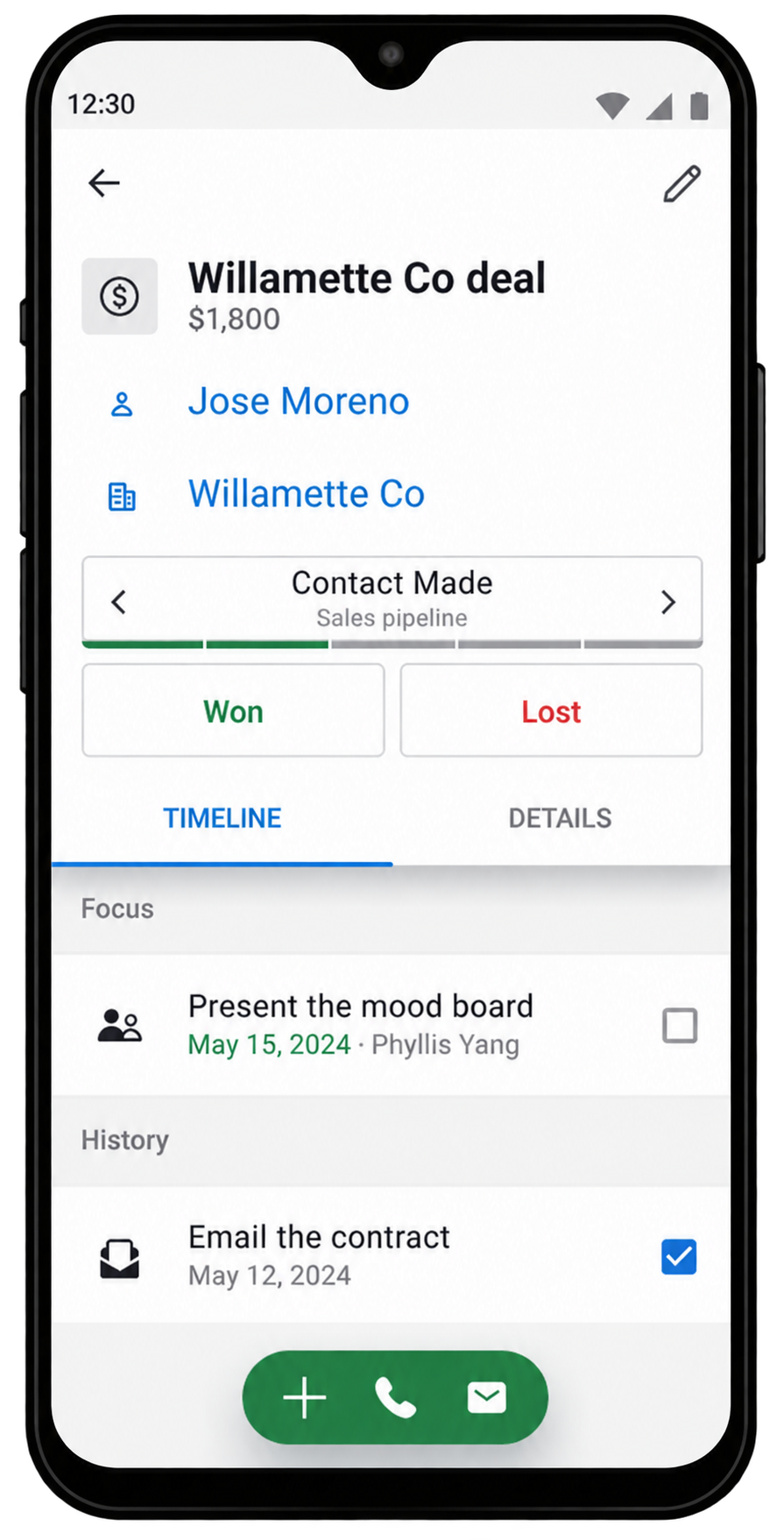
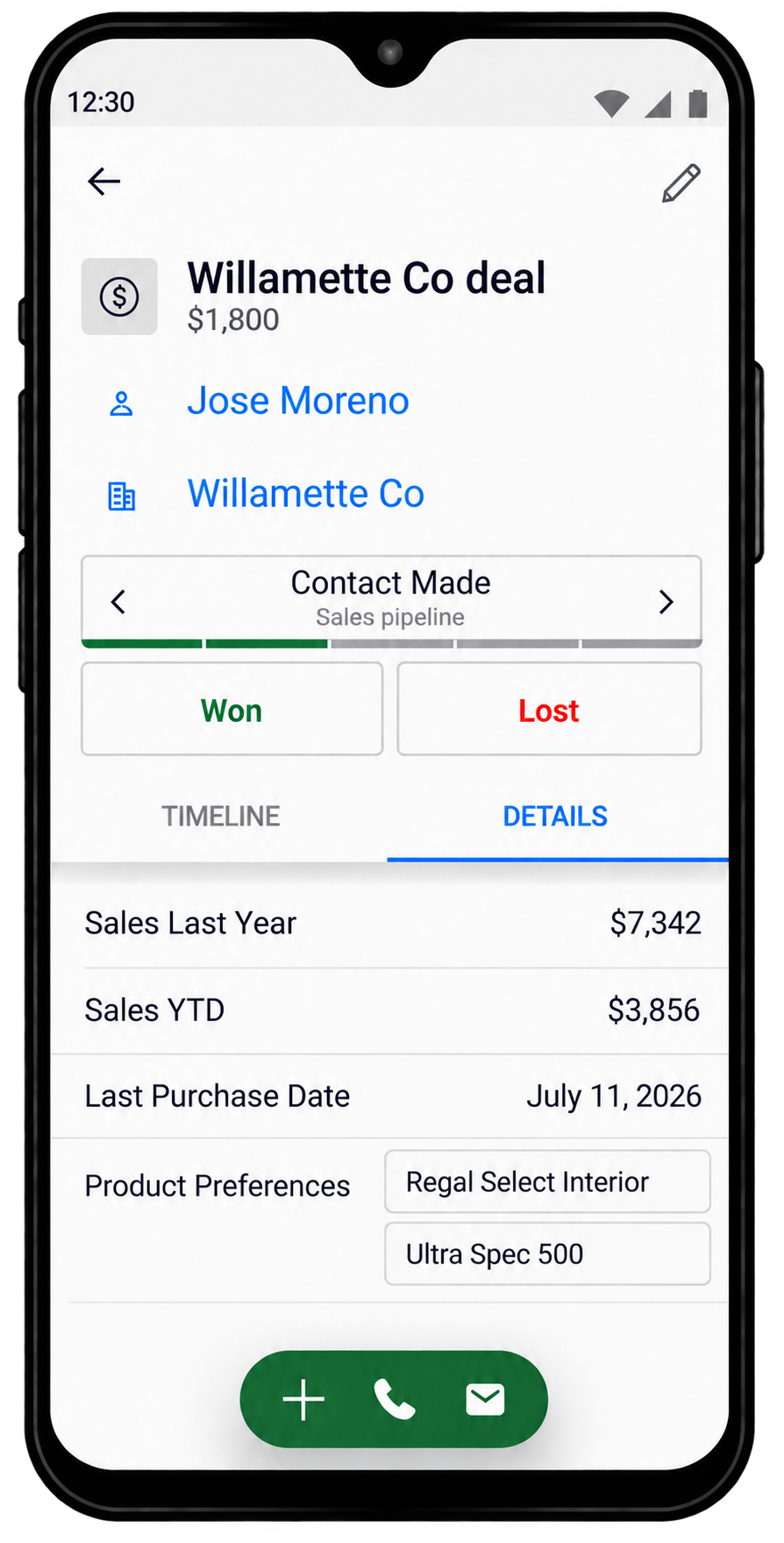
With CRM4Paint, Epicor-sourced sales fields are available inside Pipedrive’s mobile CRM app alongside customer context, activities, contact history, and next steps—whether your OSRs are in the store, in the truck, or walking into a customer visit.
- Prepare before the visitReview key customer and deal information from the field.
- Capture the conversationRecord an audio note in the field, then keep the recording as an audio file or use the transcriber to turn it into a written note.
- Keep momentum movingAdd notes, schedule the next activity, and update opportunities without returning to the office.
Where the integration creates leverage
POS data becomes a trigger—not just a report.
CRM4Paint can translate meaningful changes in purchasing or account data into timely, repeatable CRM actions. Your dealership defines the rules, timing, ownership, and communication approach.
An account hasn’t purchased
After 30, 60, 90, or any dealer-defined number of days without a purchase…
↓
THEN
Schedule a call for the assigned OSR or automatically send an approved check-in, “we miss you” message, or limited offer by email. Optional CloudTalk or JustCall functionality can extend the workflow to SMS or an AI voice-agent call.
A balance becomes past due
When available POS or accounting data shows an overdue balance that meets your criteria…
↓
THEN
Notify the account owner, assign the next step, and support a consistent, relationship-aware collection cadence.
Purchasing patterns change
When spend, frequency, product mix, or an important category declines beyond an agreed threshold…
↓
THEN
Flag the opportunity in Pipedrive and prompt the OSR to investigate before more business is lost.
Automations are not frozen at implementation. Your dealership can add, edit, pause, or remove triggers and workflows as needs change. Available actions depend on accessible POS data and any optional communication services connected to Pipedrive.
From signal to sales activity
Imagine knowing which customer needs attention—before they disappear.
CRM4Paint can turn a meaningful change in POS purchasing data into an organized workflow for the assigned sales representative.
See how ready your current system is →- 1Detect
A customer's purchasing falls below an agreed threshold.
- 2Prioritize
The account is surfaced to the assigned OSR with relevant context.
- 3Act
Pipedrive automatically schedules the call or follow-up activity for the assigned OSR.
- 4Learn
The conversation and next step become part of the shared customer record.

Why Pipedrive
Chosen deliberately from a crowded CRM market.
Before building the integration, we selected Pipedrive as the best fit for small and midsize paint dealers: easy to use, feature-rich, cost-conscious, and focused on helping salespeople sell. It was built by salespeople for salespeople—not adapted from a retail POS or enterprise IT platform.
100,000+companies
179countries
500+integrations
Pipedrive is the easy and effective CRM for closing deals—giving OSRs a clear, visual way to manage relationships, activities, opportunities, and follow-up without unnecessary enterprise complexity.
The integration already exists
Start from a proven foundation—not a blank-sheet integration project.
CRM4Paint is already working in a live, high-volume independent paint-dealer environment. It brings the reporting fields needed for outside sales from the dealer’s POS environment into Pipedrive, where they can drive visibility, activities, and automations.
AVAILABLE NOWEpicor Eagle and DaycorStandard integration includes 37 Epicor fields. Dealer-specific enhancements can be scoped separately.
COMING SOONRundoo integration
Integration, implementation, and support
More than a connector. A CRM built around your dealership.

As an authorized Pipedrive Partner, Vantage Sales Partners helps establish the platform, tailor it to the way your team sells, and support both sides of the solution after launch.
We establish your Pipedrive account and POS integration
Vantage establishes the Pipedrive account and CRM4Paint integration for eligible new customers, including access to an extended 30-day free trial.
We customize the layout to your needs
We configure the layout, fields, pipelines, activities, automations, permissions, and reporting around your dealership and outside-sales process.
We support the complete solution
We provide ongoing support for both your Pipedrive CRM environment and the CRM4Paint POS integration.
The 30-day trial applies to eligible new Pipedrive accounts created through Vantage Sales Partners and remains subject to current partner-program terms.
Independent Paint Dealer Sales & CRM Assessment
How effectively is your dealership turning customer information into sales activity?
Evaluate your customer intelligence, OSR follow-up, account development, workflow consistency, and management visibility in approximately three minutes.
- Identify gaps in your current sales system
- See where POS and CRM could work together
- Receive a practical readiness score
≈ 3 minutes
Take the assessment
Common questions
A practical CRM built around your sales process.
Is CRM4Paint a replacement for our POS?+
No. Your POS remains essential for retail operations. CRM4Paint extends the value of selected POS information into a dedicated outside-sales process built on Pipedrive.
Is this only for owners and managers?+
No. The system is designed to be useful to OSRs first—helping them prepare, prioritize, organize follow-up, and retain customer context—while giving leadership appropriate visibility.
Which POS systems can CRM4Paint support?+
CRM4Paint has been built and proven around the Epicor environment used by our initial independent paint-dealer client. The available integration depends on each dealer’s specific POS version, configuration, and data access.
Does this require a lengthy custom integration project?+
CRM4Paint does not begin from scratch. The core integration pattern, paint-dealer data model, Pipedrive configuration, and OSR workflows are already built and operating in a real-world environment. Each implementation still requires discovery, data validation, configuration, and testing—but begins from a proven foundation designed to make deployment faster and more predictable.
Do we need to build Pipedrive ourselves?+
No. CRM4Paint combines the Pipedrive platform with an implementation approach, data model, workflows, and sales process designed for independent paint dealers.
Your data already tells a story